%20scale(1.000223%200.999987)'%3e%3cpath%20d='M25.4437%2011.0153C24.4246%202.9025%2015.5699%20-2.18392%208.05445%200.921862C-4.65304%206.08009%20-1.63048%2025.4747%2012.2559%2026.1081C17.8673%2026.441%2023.2785%2023.3014%2025.3419%2017.9948H19.9255C18.399%2020.3255%2015.5604%2021.5006%2012.7885%2021.4416C8.95608%2021.5277%205.72856%2018.5679%205.15411%2014.7944H25.5878C25.583%2013.6427%2025.6325%2012.138%2025.4432%2011.0153H25.4437ZM5.40092%2010.6092C6.93978%202.78837%2018.7784%202.71038%2020.1723%2010.6092H5.40092Z'/%3e%3c/g%3e%3cg%20transform='translate(98.8848%2014.0113)%20scale(0.999553%200.999924)'%3e%3cpath%20d='M5.17011%200H0V25.1116H5.17011V0Z'/%3e%3c/g%3e%3cg%20transform='translate(98.8848%204.6664)%20scale(0.999553%201.000319)'%3e%3cpath%20d='M5.17011%200H0V5.04457H5.17011V0Z'/%3e%3c/g%3e%3cg%20transform='translate(38.3292%204.6664)%20scale(0.999553%201.000015)'%3e%3cpath%20d='M5.17011%200H0V34.4541H5.17011V0Z'/%3e%3c/g%3e%3cg%20transform='translate(108.3780%2013.5386)%20scale(0.999422%200.999968)'%3e%3cpath%20d='M22.3681%203.74456C16.12%20-2.7566%204.0497%20-0.468282%200.958192%208.1015C-3.25988%2018.9315%207.17831%2029.3707%2018.0084%2025.1555C26.5786%2022.0654%2028.8726%209.99321%2022.3681%203.74409V3.74456ZM20.6329%2014.4619C19.8154%2022.9699%207.91588%2023.9856%205.77498%2015.7045C4.61893%2011.2187%206.45358%205.68574%2011.5058%204.79885C17.6246%203.72269%2021.4161%208.65218%2020.6329%2014.4619Z'/%3e%3c/g%3e%3cg%20transform='translate(138.8502%2013.4982)%20scale(1.000341%201.000054)'%3e%3cpath%20d='M20.5326%202.7011C18.2842%200.143628%2013.0304%20-0.715204%209.67542%200.632964C8.70674%201.04383%207.89451%201.49465%207.23826%201.98684C6.48262%202.57794%205.87582%203.23466%205.41644%203.95654H5.17011V0.509796H0V25.6214H5.17011V12.0807C5.17011%2010.9651%205.34227%209.95601%205.68704%209.05247C6.3528%207.28725%207.62677%205.9738%209.33065%205.23671C11.4896%204.249%2015.0957%204.62516%2016.4947%206.22156C17.4796%207.23922%2017.9718%208.86416%2017.9718%2011.0959V25.6209H23.1419V10.6032C23.1419%207.12414%2022.2716%204.4901%2020.5321%202.70063L20.5326%202.7011Z'/%3e%3c/g%3e%3cg%20transform='translate(79.2666%2013.5184)%20scale(0.999764%200.999953)'%3e%3cpath%20d='M5.4212%204.1767C5.41978%204.17956%205.41787%204.18241%205.41644%204.18479H5.17011V0.492187H0V25.6038H5.17011V11.9C5.17011%2010.8367%205.34226%209.87372%205.68703%209.00966C6.69614%206.40178%209.29926%204.90143%2012.0636%204.92378H15.264V0H12.2362C9.26312%200%206.6852%201.69817%205.4212%204.17718V4.1767Z'/%3e%3c/g%3e%3cg%20transform='translate(14.4018%206.8037)%20scale(1.000308%201.000004)'%3e%3cpath%20d='M5.45592%200H0L2.05911%204.67745H4.6551C9.4619%204.67745%2013.3728%208.58833%2013.3728%2013.3951C13.3728%2018.2019%209.4619%2022.1128%204.6551%2022.1128H2.05911L0%2026.7903H5.45592C12.8421%2026.7903%2018.851%2020.7813%2018.851%2013.3951C18.851%206.00898%2012.8421%200%205.45592%200Z'/%3e%3c/g%3e%3cg%20transform='translate(0.0000%200.0000)%20scale(0.999464%200.999999)'%3e%3cpath%20d='M5.71699%200H0.00142663L5.30707%2012.0517C7.59254%2017.2428%207.59254%2023.1557%205.30707%2028.3467L0%2040.4018H5.71557L10.9356%2028.545C13.2767%2023.2275%2013.2767%2017.1709%2010.9356%2011.8534L5.71699%200Z'/%3e%3c/g%3e%3c/svg%3e)

I lost my mind doing an AWS external access review
- AWS
- Cloud compliance
- Research
- Cloud security

My boss gave me a simple task recently. Do a review of who outside our company has access to our AWS accounts. If you've been in security a while, you've probably done this a bunch of times. "Easy as," I told him.
If I'm being honest, I didn't think I would have to do any work at all. Between our AI agent and asset inventory, I figured just getting the prompt right would be enough. But things are never as they appear in AWS.
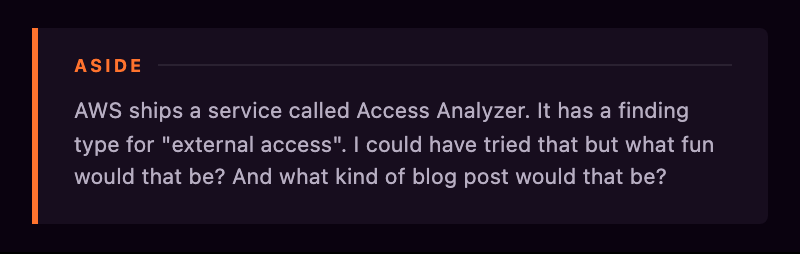
I started where I think most people would start. You give someone external access to an AWS account through a role with a trust policy that lets an external identity assume it. Find the roles that trust someone who isn't us, and I've found the external access. Two commands, maybe three.
Roles and trust policies
First I got hold of the list of accounts we own, so I had something to exclude.
Then, one account. One command, and one very large answer. Thousands of roles in a single account. Nobody is reading those by hand, so I pulled the trust policies apart and counted the principal types.
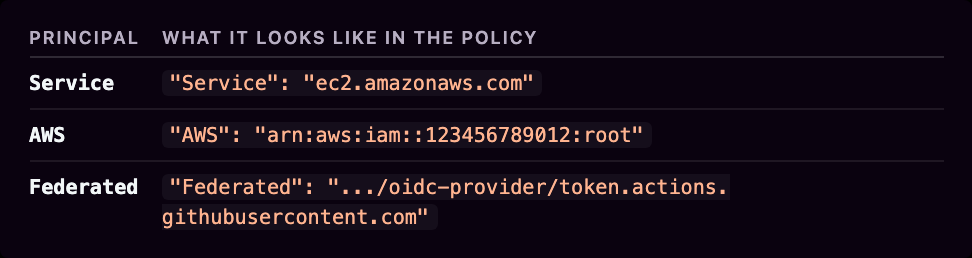
Service principals I set aside for the moment. That left the AWS principals, which I filtered down to anything that isn't this account, and the federated ones, all of which count, because a federated principal isn't an account at all. The account id in the ARN is mine. The identity behind it isn't.
Here's everything a single trust policy can point at, and the variants.
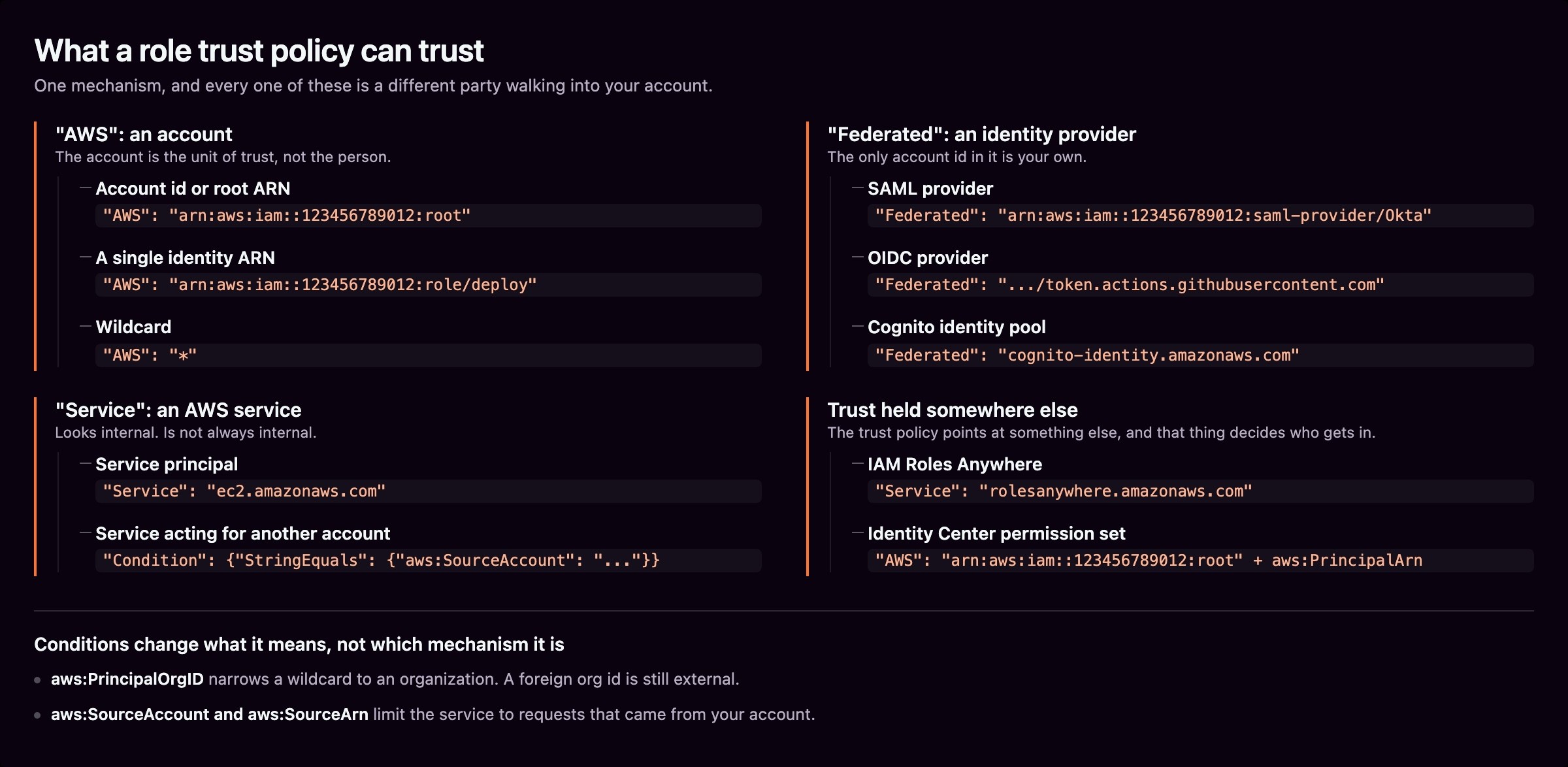
What came back was a pile of roles trusting outside stuff™️.
Most were vendor integrations, and that's the real problem with a list like this. The only difference between a vendor you pay and a vendor you fired in 2023 is institutional memory.
The federated principals were their own adventure. OIDC providers, SAML providers, Cognito identity pools. Some of those doors lead outside AWS and some don't, because an EKS cluster's issuer and Cognito are both AWS, but none of them show up in a list of accounts. A GitHub Actions OIDC trust is external access. The only account id in it is mine.
I'll spare you the rest of the role stuff. Suffice to say it wasn't easy. And umm, it was just the beginning.
Just the beginning
A trust policy is one way to give an outsider access to your account. It isn't the way. It's not even the most common way.
So I went and did the exercise properly. I built a spreadsheet of every AWS service that can hand something to a stranger, then a sandbox account full of deliberately shared resources, then I started running things and writing down what happened.
The answer to my boss's simple question turned out to be that nobody can answer it. Not me, not AWS, not any tool (at the time).
The mechanisms don't sort by service. They sort by what object carries the permission, where does that object live, and who can read it back? Whatever each service calls it, I'll call that object the permission. Sort by that, and everything falls into seven groups.
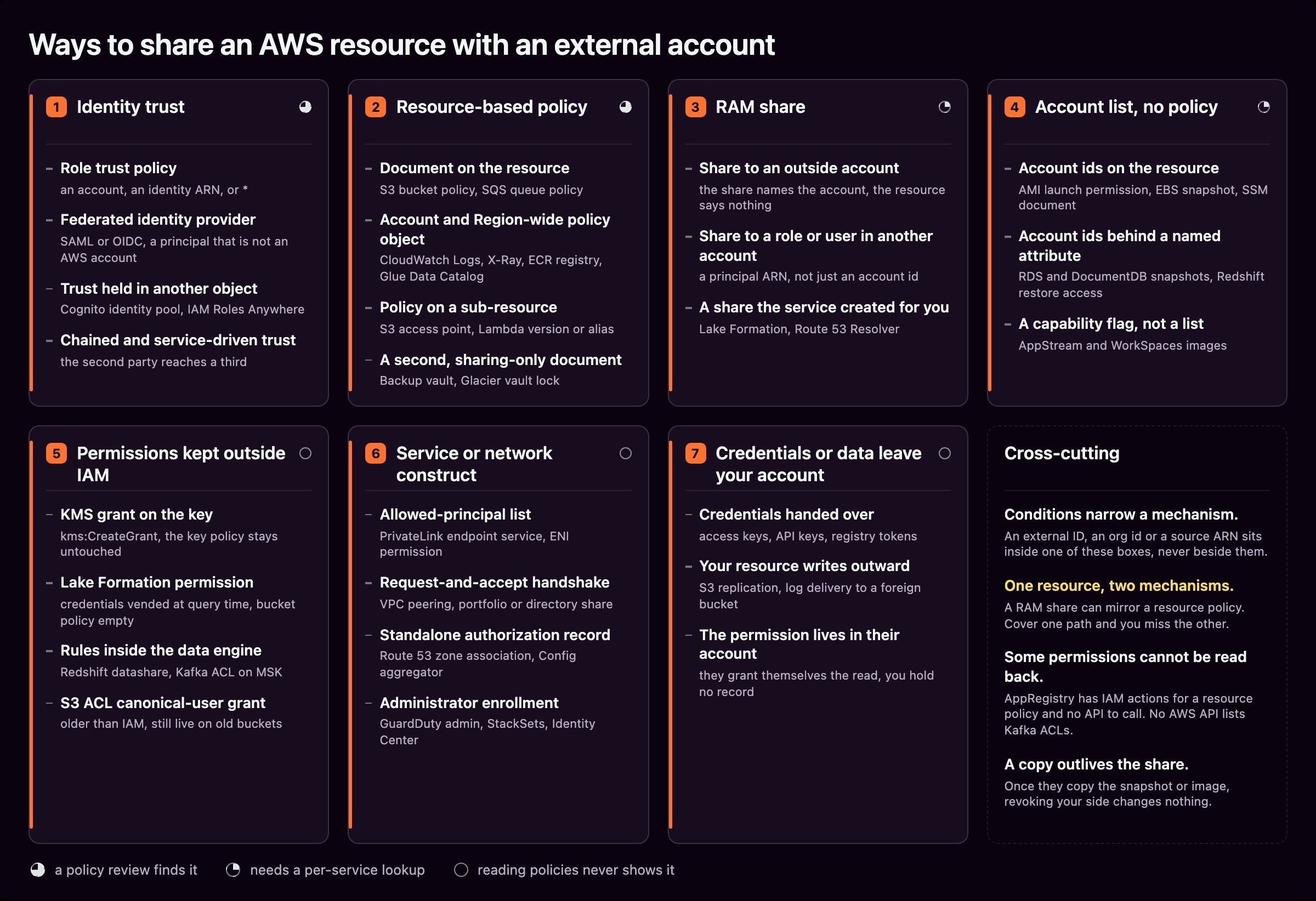
Trust policies were group one. Here are the other six.
Resource-based policies
A document sits on the resource and says who can use it. Bucket policies, queue policies, key policies. It does what you'd expect.
$ aws s3api put-bucket-policy --bucket demo-bucket --policy file://p.json
$ aws s3api get-bucket-policy --bucket demo-bucket --output text --query Policy
Then I tried to do the same thing on everything else, but consistency is antithetical to 2-pizza teams.
Not every resource has a resource policy. Plenty of shareable things have no resource policy at all, and some resources can never not have one. A KMS key always has a key policy, there's no DeleteKeyPolicy, and the default document grants the account root. So "this key has a policy" tells you nothing. Only the difference from the default means anything.
Having one doesn't mean you can share it either. Bedrock guardrails have the full setup, with a PutResourcePolicy, standard IAM syntax and a Principal element. Try to name someone else and it says no.
{
  "Version": "2012-10-17",
  "Statement": [{
  "Effect": "Allow",
  "Principal": { "AWS": "arn:aws:iam::444455556666:root" },
  "Action": "bedrock:ApplyGuardrail",
  "Resource": "arn:aws:bedrock:us-east-1:111122223333:guardrail/abc123"
  }]
}
Rejected. The only things it accepts are your own account, or "Principal": "*" narrowed by an aws:PrincipalOrgID naming your own organization. A foreign organization is refused too. CloudTrail dashboards go further and take no account principal at all, only CloudTrail's own service principal. An SSM OpsItemGroup takes a foreign account happily and then refuses to store the policy until an Account Discovery service-linked role exists in the Organizations management account. Two surfaces that look like they can share and can't, and one that can, but only after somebody upstream sets it up. That's fine until you're the one writing the checklist, at which point you have to know which is which, service by service.
Every service gets to pick its own verb for retrieving the resource policy.
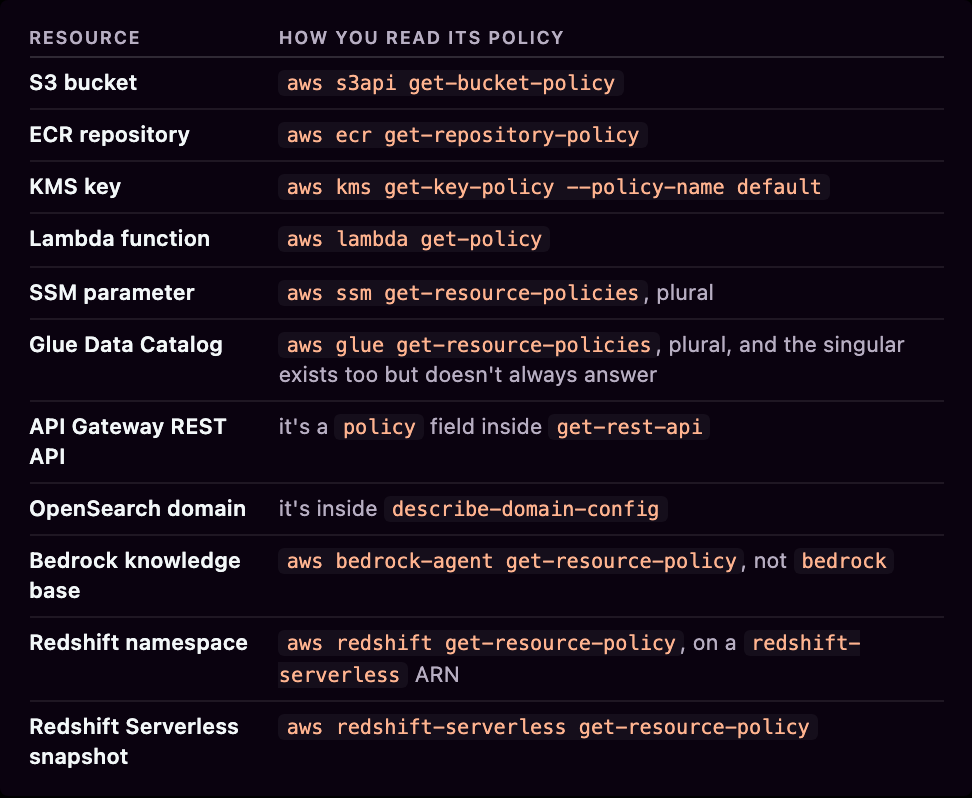
Those last three are my favorites. A Bedrock knowledge base has an ARN in the bedrock namespace and a policy you can only reach through bedrock-agent. Call it on bedrock and you don't get an empty answer, you get an error:
$ aws bedrock get-resource-policy --resource-arn $KB_ARN
An error occurred (ValidationException) ... The requested operation is not recognized by the service.
aws bedrock does have get, put and delete-resource-policy. They serve guardrails, not knowledge bases.
Redshift is internally inconsistent. A Redshift Serverless snapshot policy must leave Resource out entirely, and putting one in gets you InvalidPolicyException: Resources are not allowed. A namespace policy takes Resource set to the namespace ARN, and if you leave it out it accepts the policy and writes the ARN in for you. Both of them normalize on read, so what you get back is not what you sent.
Some of them aren't IAM policies at all. Signer keeps a list of permissions:
{
  "policySizeBytes": 180,
  "revisionId": "...",
  "permissions": [{
  "action": "signer:StartSigningJob",
  "principal": "444455556666",
  "statementId": "partner-sign"
  }]
}
No Version, no Statement, no Effect, no Resource. There's nothing there to hand to a policy evaluator until you build the IAM statement yourself. OpenSearch Serverless goes further and uses a JSON array of rule blocks with its own vocabulary:
[{
  "Rules": [{
  "ResourceType": "index",
  "Resource": ["index/my-collection/*"],
  "Permission": ["aoss:ReadDocument", "aoss:DescribeIndex"]
  }],
  "Principal": ["arn:aws:iam::111122223333:role/partner-facing-reader"]
}]
It won't accept a cross-account principal, so the only way to give an outsider access is a local role whose trust policy lets them in. No direct external access but I couldn't resist including it for the lulz.
Lambda and SNS give you a second way in, one statement at a time. add-permission takes a statement id and the service appends the statement to the document for you.
add-permission is the shortest way to give another account access to these things.
$ aws lambda add-permission --function-name my-fn --statement-id partner \
  --action lambda:InvokeFunction --principal 444455556666
$ aws sns add-permission --topic-arn $TOPIC --label partner \
  --aws-account-id 444455556666 --action-name Subscribe Receive
On the SNS side, --aws-account-id is a required list of account ids, so the API is an account list wearing a policy's clothes, and there's no way to attach a condition through it at all. On the Lambda side, --principal-org-id shares to an entire organization in one call, and add-layer-version-permission has --organization-id to do the same for a layer.
There's also --qualifier, which puts the statement on a version or an alias instead of the function.
The document underneath is real and you can write it directly, SNS through set-topic-attributes and Lambda through PutResourcePolicy, which AWS only added in August 2026. So the sharing API and the policy API are different shapes for the same job.
A statement added this way can only carry aws:SourceArn, aws:SourceAccount or aws:PrincipalOrgID, so it is fenced more loosely than a document you write yourself. And removing access needs the statement id, which you only get by reading the assembled policy first, so remove-permission is a two-step operation on something you didn't write.
And some policies are stored, readable, and completely ignored. Write a wide open auth policy on a VPC Lattice service, then set authType to NONE:
$ aws vpc-lattice get-auth-policy --resource-identifier svc-0123456789abcdef0
{
  "policy": "{ ... \"Principal\": \"*\" ... }",
  "state": "Inactive"
}
state reads Inactive while authType is NONE, and Active after you flip it back. The document is identical either way, so if you only read the policy you learn nothing, and flipping authType re-arms it with no policy write at all.
Some policies aren't on a resource at all. ECR has one registry policy per account per Region. CloudWatch Logs, X-Ray and the Glue Data Catalog each hold their own account-level collection. Logs allows ten account-scoped policies alongside the per-log-group ones, X-Ray holds named policies, and the Glue catalog holds one for the whole catalog. None of them gives you a resource to enumerate.
$ aws ecr put-registry-policy --policy-text file://p.json
$ aws ecr get-repository-policy --repository-name demo-repo
An error occurred (RepositoryPolicyNotFoundException) ...
Every repository swears it has no policy. The policy is real, it's just sitting one level up. Loop over resources asking each one for its policy and you can sweep an entire account and find nothing.
Some resources carry two documents. Glacier has an access policy and a vault lock policy, and reading one isn't reading the other. A Backup vault is meant to have two as well, an access policy and a sharing policy, except the sharing policy has IAM actions and no API to call at all, so there is nothing to read and nothing to write. Service Catalog AppRegistry does the same trick. PutResourcePolicy, GetResourcePolicy and DeleteResourcePolicy are all published as IAM actions with no operation behind them, so you can be granted permission to read a policy that has no reader.
Backup shows access that doesn't work. put-backup-vault-access-policy accepts a principal from outside your organization, so a policy reader sees external access. No copy job will ever succeed, because cross-account copy needs both accounts in one organization plus a setting turned on in the management account. A positive false positive. :D
RAM shares
Just when you thought we had too many ways to share AWS resources, AWS released Resource Access Manager. In my head this is how it went down.
"Hey dudes, a bunch of our services and resources can't be shared and our customers want to share them."
"We already have a standard approach to doing that, so we need to bring this in line with our philosophy of having a million ways to do everything."
RAM takes the permission off the resource and puts it in an object of its own, called a resource share. You create one, you list the resources it covers, and you list the principals it is for.
$ aws ram create-resource-share --name partner-share \
  --resource-arns arn:aws:route53profiles:us-east-1:111122223333:profile/rp-0a1b2c3d4e5f67890 \
  --principals 444455556666
The things RAM shares are exactly the things nobody thinks to check. App Mesh meshes, Bedrock custom models, CodeBuild projects, EC2 subnets and transit gateways, Image Builder components, Network Firewall rule groups, Route 53 Profiles, eight separate flavors of SageMaker, SSM parameters, VPC Lattice configurations. Different teams often own them, they sit in different corners of an architecture diagram, and not one of them is a bucket, a key or a queue.
For a type with no policy of its own, read the resource afterwards and it looks fine, because nothing about it changed.
For SSM parameters and CodeBuild projects, it's the opposite. RAM writes a policy onto the resource and the service will show it to you, in its own words "the resource-based policy that AWS RAM attaches to each resource in the share". Subnets, security groups, Route 53 Profiles and Cloud Map namespaces have no policy read at all, so whatever RAM attaches there, you can't see it. The same mechanism is invisible on some types and leaves a readable document on others, so you have to know which is which before a clean policy read means anything.
So the usual approach, where you list the resource types you can think of and go check each one, fails here by design. And because the share isn't on the resource, checking the resource can't save you. You have to ask RAM.
One flag decides whether a share can reach outside your organization, and the default is permissive. --allow-external-principals defaults to true, so a share created without thinking about it will accept accounts that aren't yours. Keeping the share internal means typing --no-allow-external-principals. But the CLI reference for the flag says the value only has meaning if your account is a member of an Amazon Web Services Organization. If your account isn't in one, there's no organization for the share to stay inside, so there's nothing for false to express and no way to restrict the share this way.
RAM shares can be attached to six different kinds of principals. An account id. An organization ARN. An OU ARN. An IAM role ARN. An IAM user ARN. Or a service principal name like service-id.amazonaws.com. So a share can be narrower than an account, naming one role in someone else's account, and it can be wider, naming an entire organization.
There's a warning attached to the narrow end, in AWS's words: "Not all resource types can be shared with IAM roles and users." The answer is on a separate page, a column on the shareable resources table: 44 types yes, 39 no.
The query side is also weird. list-resources --principal accepts a role ARN, checks that it looks like a role ARN, and then ignores the role name.
$ aws ram list-resources --resource-owner SELF --principal 444455556666 \
  --query 'resources[].arn' --output text | tr '\t' '\n' | sort | md5
49 resources ca0ff1ed

$ aws ram list-resources --resource-owner SELF \
  --principal arn:aws:iam::444455556666:role/this-role-does-not-exist \
  --query 'resources[].arn' --output text | tr '\t' '\n' | sort | md5
49 resources ca0ff1ed # byte-identical list
That role does not exist, and the answer is the same 49 resources. Six of them are shared with one IAM user in that account and with nothing else, so a question about a role hands back resources no role can reach.
Yet RAM parses the rest of the ARN carefully. group/ instead of role/, an sts assumed-role ARN, a wildcard, the wrong partition, a region in an IAM ARN, eleven digits instead of twelve: every one comes back Principal ID is malformed. Name an organization that isn't yours and it's malformed too. Name an OU that doesn't exist in your organization and you get UnknownResourceException, by name. RAM will look a principal up. It just won't do it for the two principal types where the answer would be narrower than an account.
You can still get the details. get-resource-share-associations --association-type PRINCIPAL reports the principal exactly as it was recorded, role ARNs and OU paths included, and it filters on the whole string. That same fabricated role ARN returns zero associations here against 49 resources there. So the real method is to list your shares, pull the principal associations for each one, pull the resources for each one, and do the join yourself. In every Region.
Which is fine once you know. The trap is that --principal looks like it already did that for you, and returns a confident answer to a question you didn't ask.
A resource share only answers half the question anyway. It names the resources and it names the principals, and it says nothing at all about what those principals can then do. That half lives in a second object attached to the share, called a managed permission.
You get one of those per resource type, not per resource. AWS is blunt about it in the associate-resource-share-permission docs: "A resource share can have only one permission per resource type." There's a --replace flag precisely because you can't add a second one, you can only swap out the one that's there. So put ten subnets in a share and all ten carry identical permissions. Want different actions on different subnets? That's a second resource share, which is how one resource ends up in several shares with different permissions, and an effective policy that stacks every share's statement into one document, each keeping its own principals.
If you don't name a permission, RAM picks one for you, the default version of the AWS default permission for that resource type, and those defaults are not small. The default for ec2:Subnet carries 57 actions, ec2:RunInstances and ec2:TerminateInstances among them. The user guide's example for that type lists three. Other types have non-default managed permissions sitting alongside the default, twenty eight of them, and the field that tells them apart is isResourceTypeDefault, not defaultVersion. One means the default permission for the resource type, the other the default version of this permission, and they sit next to each other in the same object. Nor is isResourceTypeDefault dependable, because ec2:DedicatedHost has two permissions that both claim it, the only type of the 152 that does.
Worse, AWS changes these permissions over time, and not the way IAM managed policies change. An IAM managed policy updates in place and everything attached to it moves with it. New RAM shares get the new default version, existing shares stay pinned to whatever version they were created with, so two shares of the same resource type, carrying the same permission, can grant different things.
Reading it takes two calls, because the share won't tell you what it allows.
$ aws ram list-resource-share-permissions --resource-share-arn $SHARE
{
  "permissions": [{
  "arn": "arn:aws:ram::aws:permission/AWSRAMPermissionRoute53ProfileAllowAssociation",
  "version": "1",
  "defaultVersion": true,
  "resourceType": "route53profiles:Profile",
  "status": "ASSOCIATED",
  "lastUpdatedTime": "2026-05-15T07:58:41.611000+10:00",
  "featureSet": "STANDARD"
  }]
}

$ aws ram get-permission --permission-arn <that arn> --permission-version 1 \
  --query 'permission.permission'
  "permission": "{\"Effect\":\"Allow\",\"Action\":[\"route53profiles:ListProfiles\",
  \"route53profiles:GetProfile\", \"route53profiles:AssociateProfile\",
  \"route53profiles:DisassociateProfile\", ...]}"
Note what the first call gives you. An ARN, a version, a status, and no actions. The response shape has a name field, the one list-permissions fills in, and this call leaves it empty. What the share permits is nowhere in the response. For that you take the ARN, take the version, and ask a second API. Then list-permission-versions if you want to know which versions exist.
Put a resource policy on a resource type RAM supports and RAM creates a share for you, in your account, to match it. A bucket policy or a key policy doesn't, because those types are not RAM-shareable.
$ aws codebuild put-resource-policy --resource-arn $PROJECT --policy file://p.json
$ aws ram get-resource-shares --resource-owner SELF \
  --query 'resourceShares[?featureSet==`CREATED_FROM_POLICY`].name'
[
  "Resource Share From Policy Created by RAM"
]
That share comes back with allowExternalPrincipals set to true, and nobody typed it.
RAM also attaches a customer managed permission to go with it, named as a UUID, holding the exact actions from your policy rather than a default. And list-permissions --permission-type CUSTOMER_MANAGED returns an empty list while that permission exists. get-permission on its ARN returns it in full, so it is readable but not listable, which means you can only reach it if you already know the share.
A share has two separate association lists, one for resources and one for principals. They are independent, and access only exists where both are live. So a share can look fully populated from either end and grant nothing at all.
Some types can only be shared inside your organization, and RAM mostly refuses the call rather than recording the attempt. A security group plus an external principal gets you OperationNotPermittedException: Resource ... can only be shared with principals inside your AWS organization, and the share is left as it was, with a principal, a permission, and one fewer resource than you think.
When the principal is outside your organization, RAM sends them an invitation, and they have to accept it. Until they do, the principal association sits at ASSOCIATING with statusMessage "Waiting for the principal to either accept or reject the resource share invitation." Access starts when they accept. Inside your own organization, with organization sharing turned on, there's no invitation and no waiting. Same states, different meaning depending on which side of your organization boundary the principal is on, with one exception.
That exception is retainSharingOnAccountLeaveOrganization, which keeps an account's access after that account leaves your organization, and it can only be set when the share is created. Turn it on and RAM stops counting that account as internal. AWS is explicit about it, saying RAM treats organization accounts as external accounts, requiring explicit invitation acceptance, so the invitation arrives, the association waits at ASSOCIATING, and external reads true for an account sitting inside your own organization. RAM also refuses the setting unless the share allows external principals, so the share you made to hold on to an internal account is externally capable by construction.
A resource policy has its wrinkles, but it's one document. RAM never gives you one. Six reads are required to get all the details, in every Region.
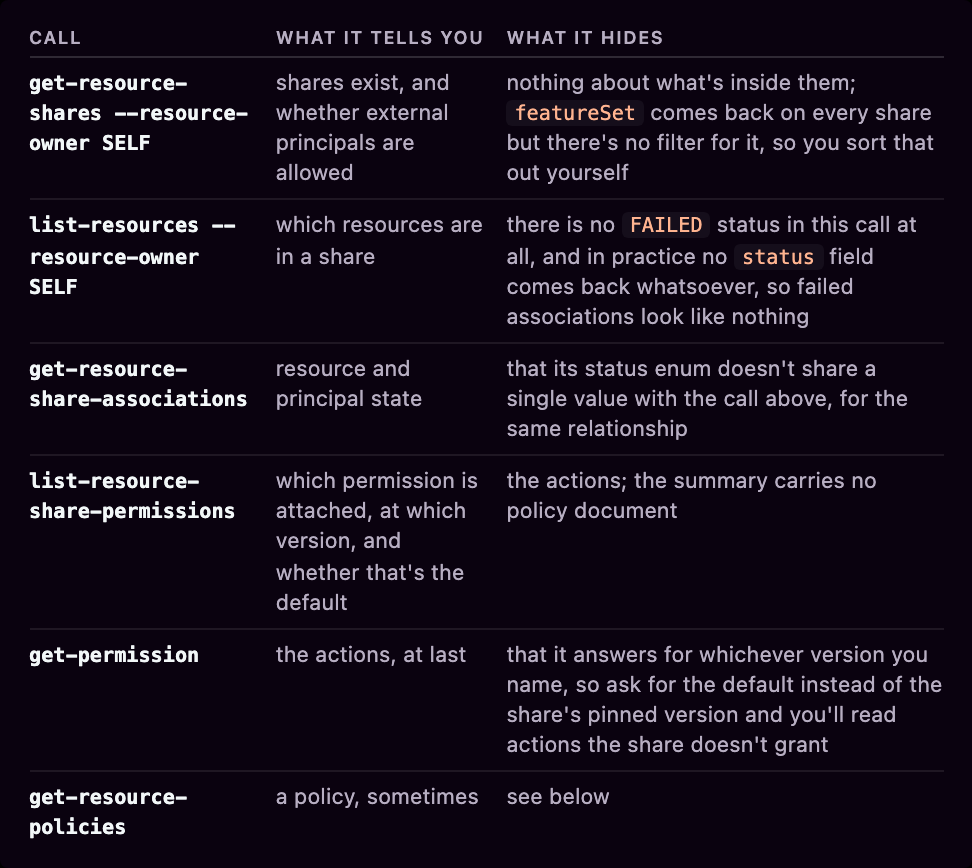
For types that don't have their own resource policy, AWS documents that RAM generates one you can read. I ran get-resource-policies against every shared type in my account and got four different outcomes:
- A full policy, for subnets, security groups, Route 53 Profiles and Cloud Map namespaces among sixteen types, but only while a principal is associated.
- The literal string
"{}"for AppSync APIs, App Mesh meshes, Bedrock custom models and CodeConnections. - An empty
policieslist for transit gateways, transit gateway multicast domains, prefix lists, Aurora DB clusters and all three Network Firewall types. Four of those are on the list AWS publishes of types where it "automatically generates a resource-based policy" you can read. Subnets are on that same list and do return one. - An exception carrying the owning service's own error text and request id, like
Resourcepolicy does not exist for Modelcard (Service: AmazonSageMaker...).
Three of those four are indistinguishable from "not shared".
It gets better. The generated policy only exists while a principal is actually ASSOCIATED, and a pending invitation doesn't count. Same resource, same share, one principal associated returns a full document whose Sid is the share's UUID plus a suffix, -external-principals for an outside account and -org-principals for one RAM treats as in-org. With none associated you get an empty list or the string "{}" depending on the type. So a share sitting armed with no current principals reads as clean.
There's a second externality field, and it isn't the share-level switch. external sits on each association. On shares RAM built for you out of a resource policy, featureSet: CREATED_FROM_POLICY, it's derived from the wrong thing. RAM sets it false whenever the source policy carries aws:PrincipalOrgID or aws:PrincipalOrgPaths, true when it doesn't. It never checks whether that organization is yours, and it never looks at the principal.
That means someone can make a grant to an arbitrary third party look internal by adding a condition naming any organization on earth, including one they have nothing to do with. Read featureSet before you trust external, or better, read the policy.
Some types are RAM-only. There is no get-*-policy for them, so if you don't scan RAM you don't see the exposure at all. Others carry both a resource policy and a RAM share, which is two separate permissions with two different action sets on one resource. Systems Manager spreads three mechanisms across two resource types: a document takes an attribute share and a RAM share, a parameter takes a resource policy and a RAM share created from it. No single resource carries all three.
Account id lists
Having fun yet?
Most snapshots, images and SSM documents don't get a policy at all. You share one by writing account numbers into a field on the resource, and that field is all there is.
No document. No conditions. No Deny. No grammar of any kind.
# AMI
$ aws ec2 modify-image-attribute --image-id ami-0abcdef1234567890 \
  --launch-permission "Add=[{UserId=444455556666}]"

# RDS DB snapshots
$ aws rds modify-db-snapshot-attribute --db-snapshot-identifier db7-snapshot \
  --attribute-name restore --values-to-add 444455556666

# Redshift, with a completely different verb
$ aws redshift authorize-snapshot-access --snapshot-identifier redshift-snap \
  --account-with-restore-access 444455556666

# SSM documents
$ aws ssm modify-document-permission --name MyDoc --permission-type Share \
  --account-ids-to-add 444455556666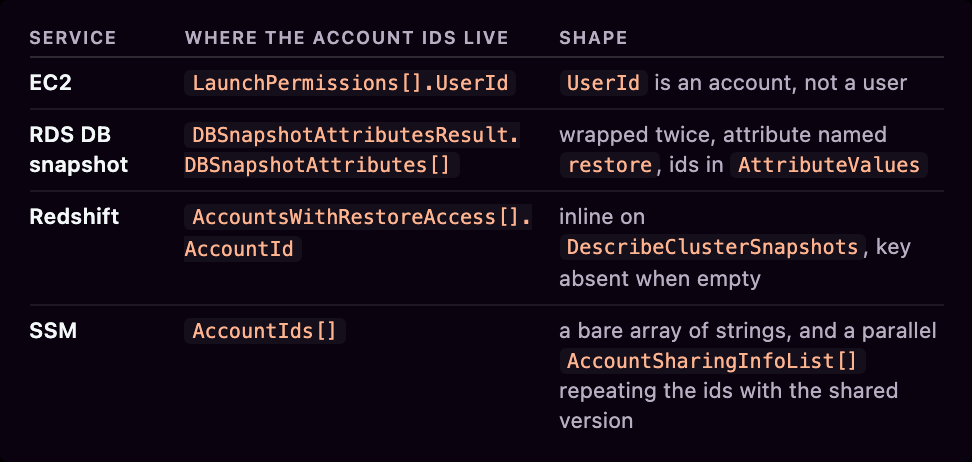
DocumentDB and Neptune feel like they belong in that RDS row and don't. Neither has an instance-snapshot API, only modify-db-cluster-snapshot-attribute, with a different identifier flag and a DBClusterSnapshotAttributesResult wrapper. Three services, one idea, and the two that copied RDS copied a different part of it.
Public is one argument away from private in most of them, and the spelling is its own small trap. EC2 wants exactly Group=all, and rejects Group=All. RDS and SSM take either and quietly rewrite it to lowercase, so a document you shared with All reads back as all. The SSM API reference prose says All while its own published pattern is (?i)all|[0-9]{12}. Same idea, three spellings, one of which is enforced.
An AMI launch permission accepts an organization ARN or an OU ARN as a grantee. An EBS snapshot, same EC2 API family, has no such field, so the SDK refuses before the call even leaves, with must be one of: UserId, Group. So that's launchPermission on an AMI, createVolumePermission on a snapshot and loadPermission on an FPGA image, three words for one idea inside a single API family.
aws opensearch authorize-vpc-endpoint-access --account is a plain account list that lets another account stand up a PrivateLink endpoint against your domain. It buys them the network path, not the data, and it has nothing to do with the domain access policy everyone reads. I built a domain to check, and the two surfaces genuinely never meet:
$ aws opensearch list-vpc-endpoint-access --domain-name my-domain --output text
AUTHORIZEDPRINCIPALLIST 444455556666 AWS Account

$ aws opensearch describe-domain-config --domain-name my-domain | grep -c 444455556666
0
The authorized account appears in no domain read at all. list-vpc-endpoint-access is the only place it exists, it needs --domain-name, and there is no account-wide view, so auditing this means one call per domain and knowing to make it.
MediaConnect goes furthest. A flow entitlement carries a Subscribers list of account ids, and it shares a live video stream rather than a stored object, so the other account builds its own flows from your feed. The same object carries DataTransferSubscriberFeePercent, which decides how much of the data transfer bill they pick up. A sharing record with a pricing term in it. Its read is inverted, too. list-entitlements returns entitlements granted to you, so an account that has granted two of them sees {"Entitlements": []}.
AppStream and WorkSpaces images both share one account per call, --shared-account-id, singular. After that they diverge completely. WorkSpaces takes a required --allow-copy-image boolean, and that boolean is the share. AWS says it plainly, "If the copy image permission is granted, the image is shared with that account. If the copy image permission is revoked, the image is unshared with the account." So there is no shared-but-cannot-copy state, and describe-workspace-image-permissions returns SharedAccountId and nothing else because there is nothing else to return.
AppStream splits it into two booleans:
$ aws appstream describe-image-permissions --name partner-image
{
  "Name": "partner-image",
  "SharedImagePermissionsList": [
  {
  "sharedAccountId": "444455556666",
  "imagePermissions": {"allowFleet": true, "allowImageBuilder": false}
  }
  ]
}
That account can run a fleet from the image and can't build with it, and the account id on its own doesn't tell you which.
describe-image-attribute takes one AMI at a time, and only the owner can call it, so nobody you shared with can see who else you shared with.
describe-images --executable-users 444455556666 returns every AMI shared with that account that you can see, which only helps if you already know the account you are worried about. AWS documents that when you name an account other than your own it silently skips AMIs shared to an organization or an OU. To enumerate grantees you loop describe-images --owners self and call describe-image-attribute once per image.
EC2 gives you no ARN to join on. Not one field in an AMI response is an ARN, while describe-security-groups in the same service hands back SecurityGroupArn. So you build it yourself, and there are two formats to pick from. AWS's IAM policy examples write arn:aws:ec2:us-east-1::image/ami-9e1670f7, with the account left empty. The Resource Groups Tagging API returns the same AMI as arn:aws:ec2:us-east-1:111122223333:image/ami-9e1670f7, with the account filled in.
Encrypted EBS and RDS snapshots need two permissions, not one. The account id in the sharing attribute gets you nothing without the KMS key, which is a different mechanism in a different place, and one I covered earlier. If the snapshot uses the AWS managed key you cannot even start:
$ aws ec2 modify-snapshot-attribute --snapshot-id snap-0a1b2c3d4e5f67890 \
  --attribute createVolumePermission --operation-type add --user-ids 444455556666
An error occurred (OperationNotPermitted) ... Encrypted snapshots with EBS default key cannot be shared
The reason is in the key policy for the aws/ebs key, and it is not a policy you can edit:
"Principal": {"AWS": "*"},
"Condition": {"StringEquals": {
  "kms:CallerAccount": "111122223333",
  "kms:ViaService": "ec2.us-east-1.amazonaws.com"
}}
Use your own key instead and the share goes through, except now the account id sits in the snapshot attribute while the key policy still names only you, and EC2 says nothing about the mismatch.
RDS automated snapshots can't be shared, and the error blames the name rather than the snapshot. RDS prefixes them with rds:, and that colon fails RDS's own identifier check. Copy to a manual snapshot and sharing works normally.
Redshift has a nice one. Authorize a snapshot to the string amazon-redshift-support and it reads back as account 784127676232, with "AccountAlias": "amazon-redshift-support" beside it. Diff the account ids against your known list and AWS Support shows up as an unexplained stranger.
Take an account off an AMI launch permission and the UserId entry does disappear, exit zero, looks like it worked. If an OrganizationArn entry is still on the list and that account sits under it, the account keeps its access, and nothing in the read-back tells you which accounts an organization entry covers. That entry doesn't have to name your organization either.
I pointed a launch permission at an organization id I have no relationship with and EC2 took it. It also took that org id paired with the wrong account id, so neither half of the ARN is checked against anything. An OrganizationArn is not evidence of an internal share. It just looks like one.
A Redshift Serverless snapshot in my sandbox is shared with an outside account through a resource policy, and get-snapshot reports it honestly in accountsWithRestoreAccess. list-snapshots drops the key altogether, for every snapshot. So the call you would sweep an account with is the one that tells you nothing, and the call that tells you the truth is the one you have to already know to make.
Grants that live outside IAM
Are you not entertained?
Some things just weren't meant to use policies I guess. Or attributes with long lists of IDs. They were born to be mini proxies that BYO permissions.
KMS grants. A KMS grant lets a principal in another account use a key, and the key policy doesn't change by a single byte.
$ aws kms get-key-policy --key-id $KEY --policy-name default --output text > before.json
$ aws kms create-grant --key-id $KEY \
  --grantee-principal arn:aws:iam::444455556666:role/PartnerReader \
  --operations Decrypt DescribeKey --name partner-read
$ aws kms get-key-policy --key-id $KEY --policy-name default --output text > after.json
$ diff before.json after.json
$
No output. Nothing changed. That grantee ARN has to resolve, too. KMS rejects a principal that doesn't exist, so a successful create-grant is itself proof the far account has that role. It's another version of the IAM principal validation technique that's been around forever.
list-grants needs a key id, so there's no account-wide view. You enumerate every key in every Region, including the AWS managed ones, which carry grants too. A customer managed key can hold fifty thousand of them.
CreateGrant returns a grant token that lets the grantee use the permission before it has propagated. AWS says that usually takes seconds and "in some cases it can take several minutes". The token appears in no later read, so list-grants gives you a grant id and nothing else.
A grant can also name a retiring principal, and that principal can be in another account. It can delete the grant using the grant id or the token alone, even when it isn't the grantee and holds no permission at all on the key. It can only retire, mind. revoke-grant from outside the owning account is denied.
My account is 111122223333. Theirs is 444455556666.
- I own a KMS key. It lives in my account and they have no permission on it whatsoever.
- I create a grant on that key and set the retiring principal, the field naming who may cancel the grant later. It takes an account id or an identity ARN, and a bare account id is stored as
arn:aws:iam::<acct>:root. I used their account, which delegates to anyone in it, exactly like:rootin a trust policy. - From their account, they run one command and get my grant back, including my key ARN and the name of an IAM role inside my account.
- From my account, I cannot run that command at all.
They cannot even look at this key:
# THEIR account. They can't read the key.
$ aws kms describe-key --key-id <my key>
An error occurred (AccessDeniedException) ... not authorized to perform: kms:DescribeKey

# THEIR account. They read the grant on it anyway.
$ aws kms list-retirable-grants --retiring-principal arn:aws:iam::444455556666:root
{ "Grants": [ {
  "KeyId": "arn:aws:kms:...:111122223333:key/1a2b3c4d-...",
  "GranteePrincipal": "arn:aws:iam::111122223333:role/PartnerReader",
  "IssuingAccount": "arn:aws:iam::111122223333:root" } ] }

# MY account, as full administrator. I can't ask the same question.
$ aws kms list-retirable-grants --retiring-principal arn:aws:iam::444455556666:root
An error occurred (AccessDeniedException) ... not authorized to perform:
kms:ListRetirableGrants ... because no resource-based policy allows the action
The reason for the odd split is that ListRetirableGrants checks permission against the retiring principal, not against the key. That principal lives in their account, so their policies can allow the call and mine never can. KMS then returns the matching grants without checking whether the caller can actually use those keys. The matching is exact, so a query for the account root only returns grants written that way. Name a specific role instead and the exposure narrows to whoever can query for that role.
So naming an outside account as a retiring principal hands them a list of my key ARNs and my role names, and leaves me unable to audit what that list contains.
Lake Formation. First you register the bucket. You hand Lake Formation an IAM role that can read it, and from then on Lake Formation decides who gets at the data:
$ aws lakeformation register-resource --resource-arn arn:aws:s3:::the-lake \
  --role-arn arn:aws:iam::111122223333:role/LakeFormationDataAccess
Then you grant on the table, which is a Glue Data Catalog table sitting over those S3 objects, not the objects themselves. Every new table carries an ALL grant to IAM_ALLOWED_PRINCIPALS, and you have to revoke it yourself. On cross-account version 3 or below Lake Formation rejects the grant outright and names the reason. On version 4 the grant succeeds and AWS says the failure moves to the consumer's read instead.
$ aws lakeformation grant-permissions \
  --principal DataLakePrincipalIdentifier=444455556666 \
  --resource '{"Table":{"CatalogId":"111122223333","DatabaseName":"db","Name":"orders"}}' \
  --permissions SELECT
$ aws s3api get-bucket-policy --bucket the-lake
An error occurred (NoSuchBucketPolicy) ...
The consumer runs a query through Athena or Redshift Spectrum. The engine asks Lake Formation whether they may read that table. Lake Formation checks its own permission list, and if the answer is yes it hands the engine temporary credentials borrowed from the role you registered. The engine reads your S3 objects using those.
I ran both halves from the other account, as a role whose only S3 permission is its own Athena results bucket:
# THEIR account, reading the object directly
$ aws s3api get-object --bucket my-lake --key sales/sales.csv out.csv
An error occurred (AccessDenied) ... not authorized to perform: s3:GetObject
because no identity-based policy allows the s3:GetObject action

# THEIR account, the same bytes through Athena
$ aws athena start-query-execution --query-string 'SELECT city, widgets FROM sales'
State SUCCEEDED, DataScannedInBytes 49
city widgets
sydney 7
perth 3
In my account's CloudTrail the borrow is visible as sts:AssumeRole on my registered role, invokedBy: glue.amazonaws.com, with a session policy narrowing it to the table's prefix for an hour.
And that is why there is no bucket policy. The role doing the reading is the one you registered, which lives in your account, and a same-account read only needs an allow on one side. That role's identity policy is the allow. No cross-account S3 access ever happens, because by the time anything touches the bucket it is your own role reading your own objects. The cross-account decision was made earlier and elsewhere, by Lake Formation, against a Glue table.
The permission is recorded, just not anywhere near S3. The row is in lakeformation list-permissions, and the cross-account grant also leaves a RAM share. Nothing on the bucket points at any of them.
Grant a named table or database to another account in Lake Formation and it calls RAM for you. How many shares you get depends on the cross-account version. Version 1 makes one share per grant, version 2 onwards packs many grants into one, and version 5 stops using individual resource associations and shares wildcard patterns instead.
AWS's own page on auditing these will send you somewhere that doesn't exist. It says "the only way to view all cross-account grants in one place is to use the glue:GetResourceShares API operation". There is no such operation. AWS's policy validator will even tell you so:
$ aws accessanalyzer validate-policy --policy-document file://p.json ...
"findingType": "ERROR", "issueCode": "INVALID_ACTION",
"findingDetails": "The action glue:GetResourceShares does not exist."
The call that works is get-resource-policies, plural, which the same page uses in its own code block. The page was right until 2022, when a rewrite changed the title, the breadcrumb, the prose and the See-also label and missed the code. Four years, nine occurrences of the wrong name on the page today.
That same page tells you to spot Lake Formation grants by looking for extra entries in get-resource-policies. I made a cross-account grant on a clean account and the list stayed empty, because at cross-account version 4 the grant lives entirely in the RAM share.
A grant can name an LF-Tag expression instead of a resource, so it covers every database, table and column that matches the tags now and everything that matches them later, and the grant never names the thing it exposes. And --permissions-with-grant-option lets the receiving account grant it onward. lakeformation list-permissions does show PermissionsWithGrantOption, so your account records that you handed over the right to re-grant. What it can't show you is who they gave it to.
Redshift datashares. The permission is a SQL object inside the database. The producer creates the datashare and adds schemas and tables with SQL, then authorizes a consumer account with the API. The consumer's administrator associates it. The API tells you who, and only SQL tells you what.
OpenSearch fine-grained access control. A domain has two authorization layers: the AWS-side domain access policy, and the domain's own internal security plugin with its own users, roles and role mappings. The internal layer is reached over the domain's HTTP API, not through an AWS API, so reading the access policy tells you about one of the two.
Kafka ACLs on MSK. Kafka is a message broker. Producers write to topics, consumers read from them. Apache Kafka has always had its own authorization model, ACLs, which are rules held in the cluster's own metadata saying which principal may do what to which topic. MSK is AWS running Kafka for you, so a cluster there can be told to authorize either the Kafka way, with ACLs, or the AWS way, with IAM. Both systems exist on the same cluster.
You write an ACL with Apache Kafka's own admin tool, kafka-acls.sh, which ships with Kafka and knows nothing about AWS. It talks to the brokers over the Kafka protocol, not to any AWS endpoint:
$ kafka-acls.sh --bootstrap-server $BS --command-config client.properties \
  --add --allow-principal 'User:arn:aws:iam::444455556666:role/PartnerReader' \
  --operation Read --topic orders
That principal is a role in another account, and the rule naming it now lives inside the cluster rather than in anything AWS models as a resource.
ACLs are readable, you just can't get at them the way you get at everything else in this post. kafka-acls.sh --list returns them, or AdminClient.describeAcls() if you would rather write code, and either way you are a Kafka client. You need network reachability to the brokers and credentials the cluster accepts. What you cannot do is ask AWS. aws kafka has no ACL verb at all, describe-cluster returns the shape of your authentication and never the rules, and because the changes travel over the Kafka protocol rather than an AWS API, CloudTrail never sees them. MSK's authorizer logs are the nearest thing, and they are off by default and record decisions rather than rules.
Answering "who can read this topic" means standing up a client per cluster, which is a different kind of work from calling an API.
Then it gets funny. On an IAM-authenticated cluster, AWS says Kafka ACLs "have no effect on authorization for IAM identities". So a rule like the one above is never consulted. Meanwhile MSK ships with allow.everyone.if.no.acl.found set to true, so on a SCRAM or mTLS cluster a topic with no ACL is open to every authenticated principal. And with mTLS the identity is a certificate subject issued by a private CA that can live in another account, which describe-cluster shows you as an opaque list of CA ARNs. Nothing names the subjects that CA will vouch for.
S3 ACLs. The oldest grant record in AWS, and still alive on old buckets. Sounds like my lower back and knees.
$ aws s3api put-bucket-acl --bucket legacy-bucket \
  --grant-read id=<their 64-character canonical user id>
$ aws s3api get-bucket-policy --bucket legacy-bucket
An error occurred (NoSuchBucketPolicy) ...
That grantee is a canonical user id, usually sixty four lowercase hex characters with no account id anywhere inside it. AWS calls it "an obfuscated form of the AWS account ID", and no API turns one back into an account. You aren't stuck, though. Access Analyzer for S3 reads bucket ACLs and names the external account for you, and CloudTrail will name it too once somebody uses the grant. Failing both, ask the counterparty to run aws s3api list-buckets --query Owner.ID and compare. Confirming a suspect is easy. Identifying a stranger from the id alone is not.
There's also a predefined group URI called AuthenticatedUsers, and it does not mean authenticated in your account. It means every principal with an AWS account. Being authenticated buys them nothing in AWS's eyes either, because S3 considers a bucket or object ACL public if it grants any permissions to members of the predefined AllUsers or AuthenticatedUsers groups, so Block Public Access blocks it.
get-bucket-acl reports the permissions in force, not the ones stored, so with IgnorePublicAcls switched on the grant simply isn't in the response. I put an AuthenticatedUsers READ grant on a bucket, flipped that one flag, and read the ACL a second later:
# BPA off
"Grants": [ { "Grantee": { "Type": "Group",
  "URI": "http://acs.amazonaws.com/groups/global/AuthenticatedUsers" },
  "Permission": "READ" }, ... ]

# IgnorePublicAcls on, one second later, nothing written to the ACL
"Grants": [ ... the AuthenticatedUsers row is gone ... ]
Turn the flag off and it comes straight back, because it was stored the whole time. So a bucket can carry a grant to every AWS account that no ACL read will show you, and the moment somebody relaxes Block Public Access it is live again with nobody having touched the ACL. Of the four flags only IgnorePublicAcls does this, and BlockPublicAcls on its own is worse than it sounds, because it merely refuses new public ACL writes, so an existing grant stays visible and stays enforced. CloudTrail is the one place the truth survives, in the original PutBucketAcl event.
On a new bucket you have to turn two things off before an ACL grant will even land: Object Ownership defaults to bucket-owner-enforced, which refuses ACLs outright, and Block Public Access refuses the public ones. Both are on by default and either one alone stops you.
Object ACLs are worse again, because they're per object and no API lists objects whose ACL names a foreign grantee, though an S3 Inventory report configured with ObjectAccessControlList will.
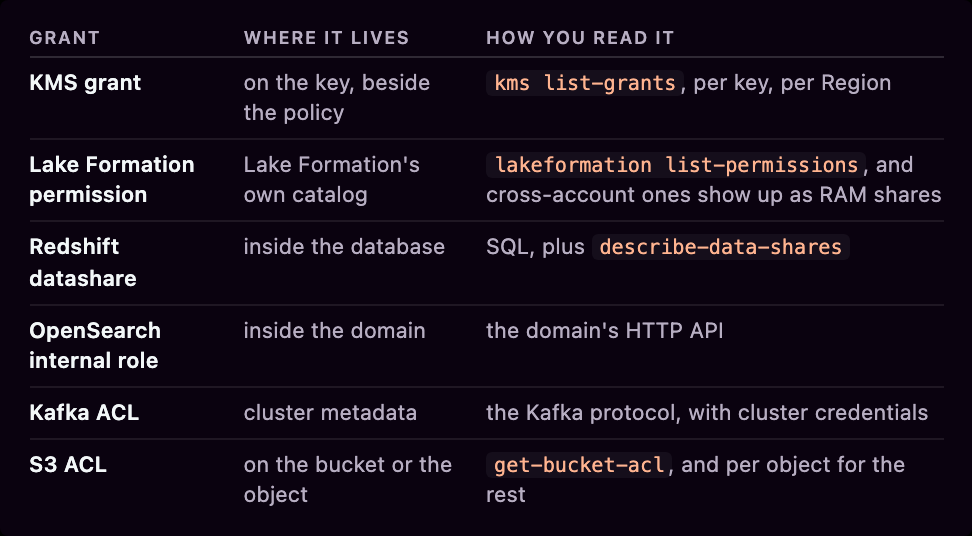
So the read path for this whole group looks like this, and not one row of it is a policy read.
Configuration that grants access
I don't even know if this is a different category of its own at this stage. My brain is mush.
# PrivateLink: the consumer account goes on an allow list
$ aws ec2 modify-vpc-endpoint-service-permissions --service-id $SVC \
  --add-allowed-principals arn:aws:iam::444455556666:root

# Route 53: the thing being trusted is a VPC, not an account
$ aws route53 create-vpc-association-authorization --hosted-zone-id $ZONE \
  --vpc VPCRegion=us-east-1,VPCId=vpc-0abc123

# Config: an account and Region pair gets a whole-account configuration read
$ aws configservice put-aggregation-authorization \
  --authorized-account-id 444455556666 --authorized-aws-region us-east-1
Three objects, none of them a policy, none of them attached to the resource being reached.
PrivateLink has two independent gates that people read as one, the same shape as the OpenSearch case above. The allowed-principals list decides who may connect, and AcceptanceRequired decides whether each connection needs a human. The principal type enum is All | Service | OrganizationUnit | Account | User | Role. There's no Organization value, so you can name an OU but not an organization. Set a private DNS name and, when the consumer creates their endpoint, AWS puts a private hosted zone inside their VPC pointing at it. A grant that materializes as DNS in someone else's account.
The Route 53 one is my favorite oddity of the whole exercise, because there's no account in the authorization to review. You're trusting a VPC. And AWS is explicit that tidying up afterwards changes nothing: "If the VPC is already associated with the hosted zone, DeleteVPCAssociationAuthorization won't disassociate the VPC from the hosted zone." The authorization is a permission slip, not a live link, so the tidy habit of deleting it afterwards leaves the access in place and removes the only record you had of it.
An ENI permission hands attach or Elastic IP association rights to a single named account, with no accept step and no invitation. The receiving account has to be one AWS has authorized for this, and most aren't. Naming the account I use everywhere else in this post gets The account 444455556666 is not permitted to receive cross account permissions. With the Elastic IP variant, your private interface gains a public address that you didn't allocate and can't see in your own EIP list.
With Transit Gateway and Cloud WAN, RAM only covers half of the sharing. The hub is shared with RAM. The attachment a consumer then creates is a separate cross-account object that RAM knows nothing about, so a clean RAM read on the hub says nothing about who is attached. A Cloud WAN core network manages three at once. It's RAM-shareable, it carries its own resource policy, and it accepts attachments.
A CloudWatch Logs destination and the sender's subscription filter, an OAM sink and the source account's link, a Config aggregation authorization and the aggregator, a Direct Connect association proposal and its acceptance, a VPC peering request and its accept. In every case you can read your half and only your half.
Every AWS security service ships the same shape under a different name, an administrator account in another account that reads what you have and, for most of them, writes your configuration too. Detective is the closest to read-only, and even that one can add you to someone else's behavior graph without asking. Config is not read-only at all. Its aggregator is, but the same delegated administrator writes organization rules and conformance-pack remediation into your account in a form you can't modify. GuardDuty, Security Hub, Macie, Inspector, Detective, Config.
A backup policy written at the organization level creates backup plans and cross-account copy rules inside every member account. A StackSets execution role lets an administration account deploy CloudFormation into your account, and the self-managed flavor usually carries AdministratorAccess.
Credentials and copies
When the ancients built the first service in the cloud, they could not imagine what was to come, and so they did things. Bad things. They didn't know they were bad. They couldn't know. But now we know.
The last group does leave records in your account. The records just don't say where or by whom they'll be used, which makes this lot unauditable by construction rather than by accident.
Access keys handed to a vendor. No trust policy, no AssumeRole, nothing to enumerate, nothing to revoke except the key. But only if John from CloudOps knows what it's used for.
The mechanism to know about is the IAM service-specific credential: a long-lived secret attached to an IAM user and scoped to exactly one service. CodeCommit and Keyspaces have used it for years, and it is what AWS now calls a long-term API key on four newer services, Bedrock, Claude Platform on AWS, CloudWatch and CloudWatch Logs. On those four a managed policy is attached to the user for you. You mint it from the Bedrock or CloudWatch console, which never says the words "IAM user", and the secret is shown once and never again.
$ aws iam create-service-specific-credential \
  --user-name APIKeyUser --service-name bedrock.amazonaws.com \
  --credential-age-days 30
Note --credential-age-days is optional. AWS's own words: "If you omit this parameter, the API key does not expire." The console makes you choose a duration from a list. The CLI makes never-expiring the default for anyone who doesn't type the flag.
Reading them back needs the service name, which means you have to already know a service supports this:
$ aws iam list-service-specific-credentials --service-name bedrock.amazonaws.com --all-usersThere is no call that lists every one of these in the account, so you enumerate by guessing service names.
My sandbox turned out to be holding two I had no memory of, both on the same IAM user, both Active, both with expires: null. One was a Bedrock API key, nine months old. The other was a Keyspaces credential, which is the older flavor of the same thing and the reason you cannot just check the four API key services and call it done.
Then there is the rest of the family, none of which is an IAM credential and all of which authenticates somebody: CodeCommit and Keyspaces service credentials, API Gateway API keys, AppSync API keys, IoT certificates, EC2 key pairs, ECR and CodeArtifact tokens, RDS and Redshift database users, MSK SCRAM secrets, CloudFront key groups whose private key mints signed URLs. Every one is a way for someone outside your account to act, and not one of them appears in a resource policy, a trust policy, a RAM share or an Access Analyzer finding.
Separately, your own resources can push data outward, and reading the policy doesn't tell you what happens next.
$ aws s3api put-bucket-replication --bucket source-bucket \
  --replication-configuration file://rule.json
The role is in your account. The destination bucket policy is in theirs, so the object that decides whether this works is one you can't read. Ownership of the replicas can move as well. You can hand it over yourself with AccessControlTranslation in your own rule, or they can take it, because BucketOwnerEnforced Object Ownership on their bucket makes them the owner the moment your object lands and needs nothing from you.
A queue policy granting sqs:ReceiveMessage and sqs:DeleteMessage to another account isn't a read grant, it's a consumer. They receive and delete, and the message is gone from your queue. An SNS topic policy allowing Subscribe lets the other account attach its own endpoint and choose its own filter, and for https, email and sms protocols the endpoint is a URL or an address with no account behind it, though the subscription record itself still names the principal who created it.
logs:PutAccountPolicy with a SUBSCRIPTION_FILTER_POLICY applies one filter to every log group in the account, including the ones created after you set it, streaming content to a destination that can be owned by another account. The log group never mentions it. describe-subscription-filters on a group the policy is actively filtering comes back empty.
A copy is a new resource that they own.
- They call
CopySnapshotorCopyImageon something you shared, and the result is theirs. Removing your share afterwards does nothing. - A Data Lifecycle Manager policy with share rules shares every snapshot the schedule creates, automatically, for as long as the policy runs. One low-visibility config object, a continuous stream of shared resources.
ec2:CreateStoreImageTaskwrites an entire AMI, snapshots included, as a single object into an S3 bucket. If the bucket is in another account, the AMI leaves with no launch permission anywhere.- A destination vault policy allowing
backup:CopyIntoBackupVaultlets your copy job create an independent recovery point in their account, which they can restore after you delete yours. That one needs both accounts in the same organization and the feature switched on from the management account, so it is the rare copy path with a fence around it.
Add a foreign Lambda layer ARN to your function and their code runs in your execution environment, with your execution role and your environment variables. Point a task at an image in someone else's ECR registry and whatever they push behind that tag runs with your task role attached. A pull-through cache rule makes it look like your own registry, and the upstream can be another account's private ECR, not just a public one.
The one I liked least was SES sending authorization, which lets another account send mail as your verified domain, signed with your DKIM keys, from their account. The grant is a policy on your own verified identity, so this is one you can at least read, with aws sesv2 get-email-identity-policies. Bounces and complaints land on their SES reputation rather than yours, so the thing you have handed over is your domain's standing with the mailbox providers that receive it.
So what about Access Analyzer
External access findings support fifteen resource types. S3 buckets and directory buckets, IAM roles, KMS keys, Lambda functions and layers, SQS queues, Secrets Manager secrets, SNS topics, EBS volume snapshots, RDS DB snapshots, RDS DB cluster snapshots, ECR repositories, EFS file systems, DynamoDB streams and tables. That's the list.
Inside those fifteen it reaches past policy documents into the mechanisms this whole post is about. AWS says it "analyzes the key policies and grants applied to a key", so KMS grants count. It reads S3 bucket ACLs, which are group five. It reads the EBS and RDS snapshot sharing attributes, which are group four and are not policies either. So it is not a policy reader with a short list, it is a genuine multi-mechanism tool with a short list.
But then there are the exclusions...
- The supported-types page says plainly, "It only analyzes resource-based policies."
- Lambda: "doesn't report external access based on resource-based policies attached to aliases and specific versions invoked using a qualified ARN."
- S3: it doesn't analyze the policy on a cross-account access point, "because the access point and its policy are outside the analyzer account."
- RDS: "does not identify public or cross-account access configured directly on the database itself."
- RDS cluster snapshots: "findings do not include monitoring of any share of Amazon RDS DB clusters and clones with another AWS account or organization using AWS Resource Access Manager."
- "IAM Access Analyzer doesn't currently report findings from AWS service principals or internal service accounts."
- KMS: if the key policy won't let the analyzer read key metadata, you get an
ACCESS_DENIEDerror finding instead of an answer.
Findings also lag. A policy change takes up to 30 minutes to show up, and a resource control policy change doesn't trigger a rescan at all, it waits for the next periodic scan "within 24 hours".
The first scan is the one that caught me out. I turned an analyzer on in the sandbox and watched it fill up.
t+1min 13% of the findings it would eventually report
t+6min 24%
t+10min 25%
t+15min 35%
t+20min 100%
It gets there. It just doesn't tell you when it has. The analyzer reports status: ACTIVE within seconds of creation, and there's no field anywhere in the API that separates "still scanning" from "finished". At one minute I had an eighth of the answer and no way to know it. Screenshot that for a report and you've shipped a number that's wrong by a factor of eight.
{
  "id": "a1b2c3d4-5e6f-7a8b-9c0d-1e2f3a4b5c6d",
  "resource": "arn:aws:iam::111122223333:role/example-AccessRole",
  "resourceType": "AWS::IAM::Role",
  "resourceOwnerAccount": "111122223333",
  "status": "ACTIVE",
  "findingType": "ExternalAccess",
  "analyzedAt": "...", "createdAt": "...", "updatedAt": "..."
}
There's no principal in there, and nothing else in it says who got access.
There is an older call that does. Same analyzer, same finding id, aws accessanalyzer list-findings:
{
  "id": "a1b2c3d4-5e6f-7a8b-9c0d-1e2f3a4b5c6d",
  "principal": { "AWS": "444455556666" },
  "action": [ "sts:AssumeRole" ],
  "resource": "arn:aws:iam::111122223333:role/example-AccessRole",
  "resourceType": "AWS::IAM::Role",
  "isPublic": false,
  "condition": {},
  "status": "ACTIVE"
}
Who, what they can do, whether it's public, and any conditions, all inline. That call isn't deprecated, it's narrower, because AWS scopes it to external access analyzers, so "you must use ListFindingsV2 for internal and unused access analyzers". If your review covers all three kinds, v2 is your only list, and getting a principal costs one get-finding-v2 per finding. That was 615 findings in my sandbox, so 616 calls where v1 would have taken one.
I'm sorry boss man
You can't prove a negative about external access on AWS from inside your own account. Some permissions have no reader and some of them live in the other party's account.
What you can do is know all seven mechanisms, ask every service what it has shared, and keep a list of the calls that lie to you. That beats a green tick from a service that covers fifteen resource types.
I did eventually give him an answer but it took a couple of months instead of a couple of days.
We did it by building it into Plerion.
It is called resource access grants, and it turns a share into a row. One grant is one resource giving access to one principal, so a policy naming four accounts becomes four grants you can sort and filter.
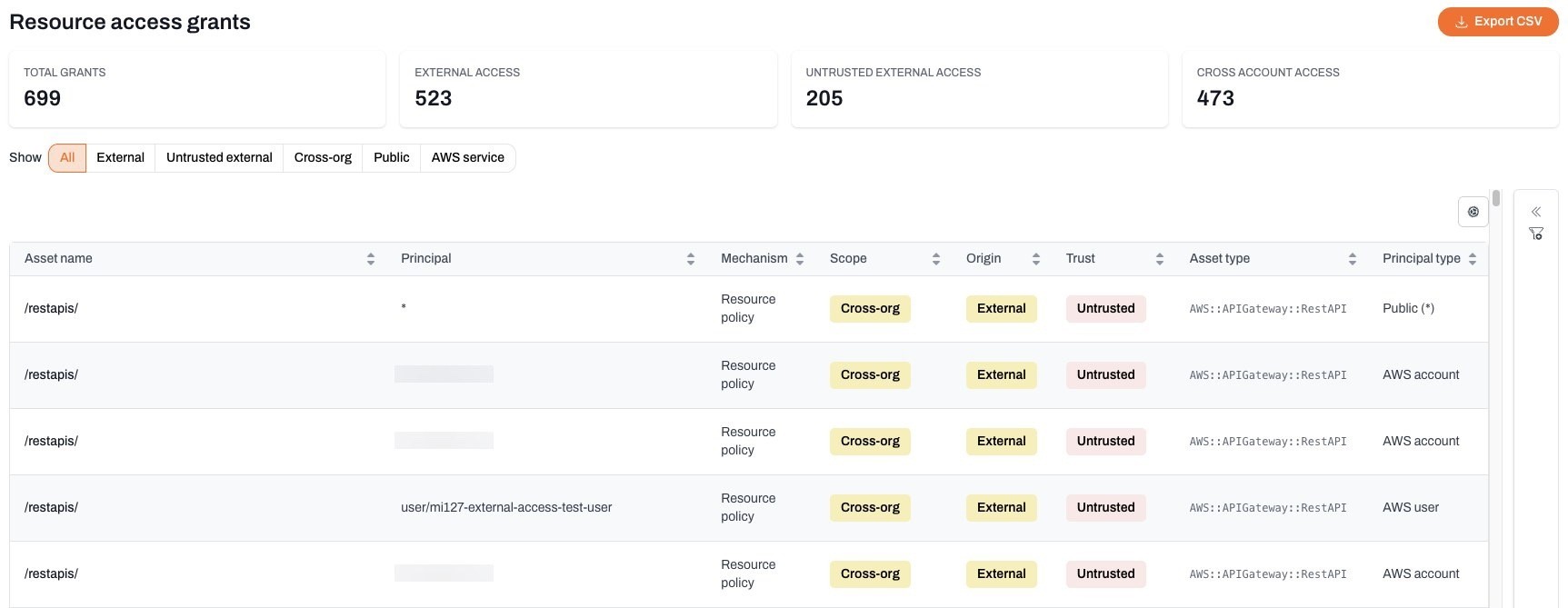
It covers four of the seven groups in this post (for now). Role trust policies, resource policies, RAM shares, and account id lists. It reads the RCPs attached to your organization and works out whether a grant is actually blocked, which is the bit I could not do by hand. Then it sorts every grant by scope, so public and cross-org and federated are separate answers rather than one pile.
Most of your external access is deliberate: the vendor you pay, the partner account, the CI provider. What you want is the ones nobody has vouched for. So each external grant carries a trust state, you mark the ones you meant, and what's left over becomes an untrusted external access finding, one per asset.
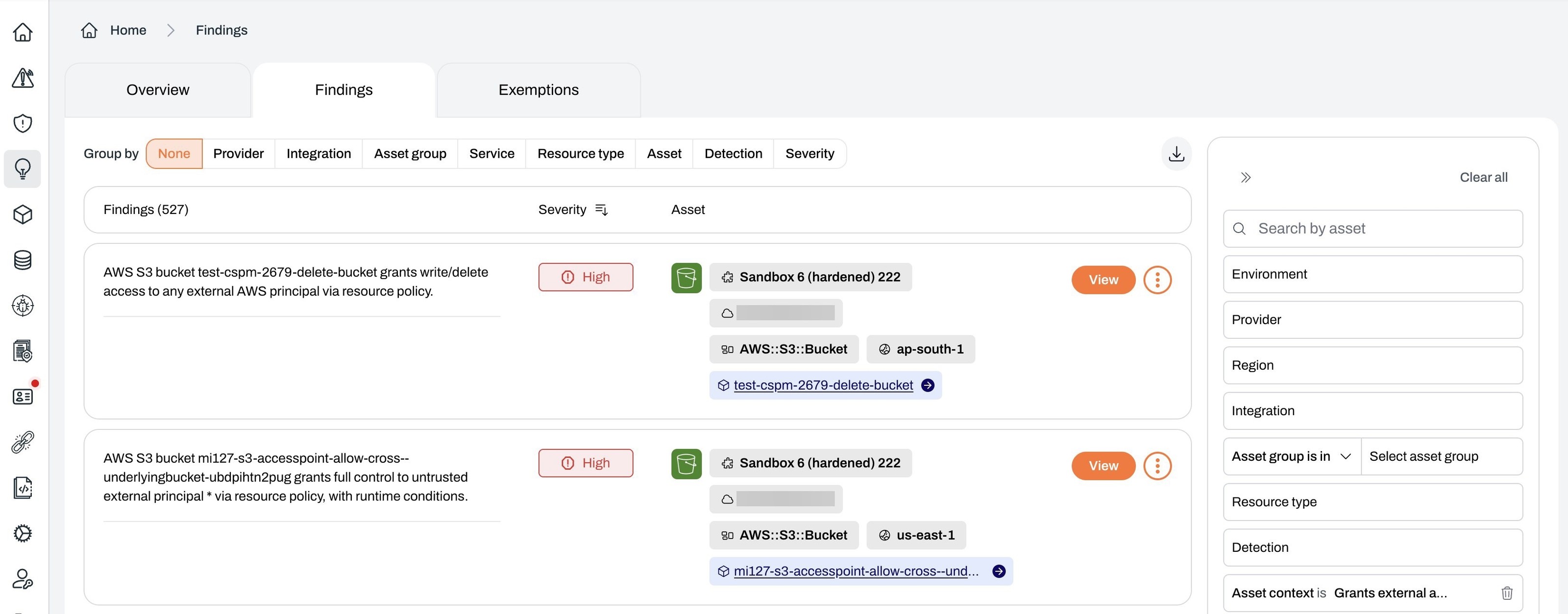
Open one and you get the principals holding the grant, and you can trust a principal from there rather than going and finding it somewhere else.
That's the answer to my boss's question. "Who has access from outside" is a list of facts, and on a real account it is a long one. "Who has access from outside that nobody has signed off" is a list of work, and that one you can close out. It shrinks as you go instead of coming back the same size every scan.